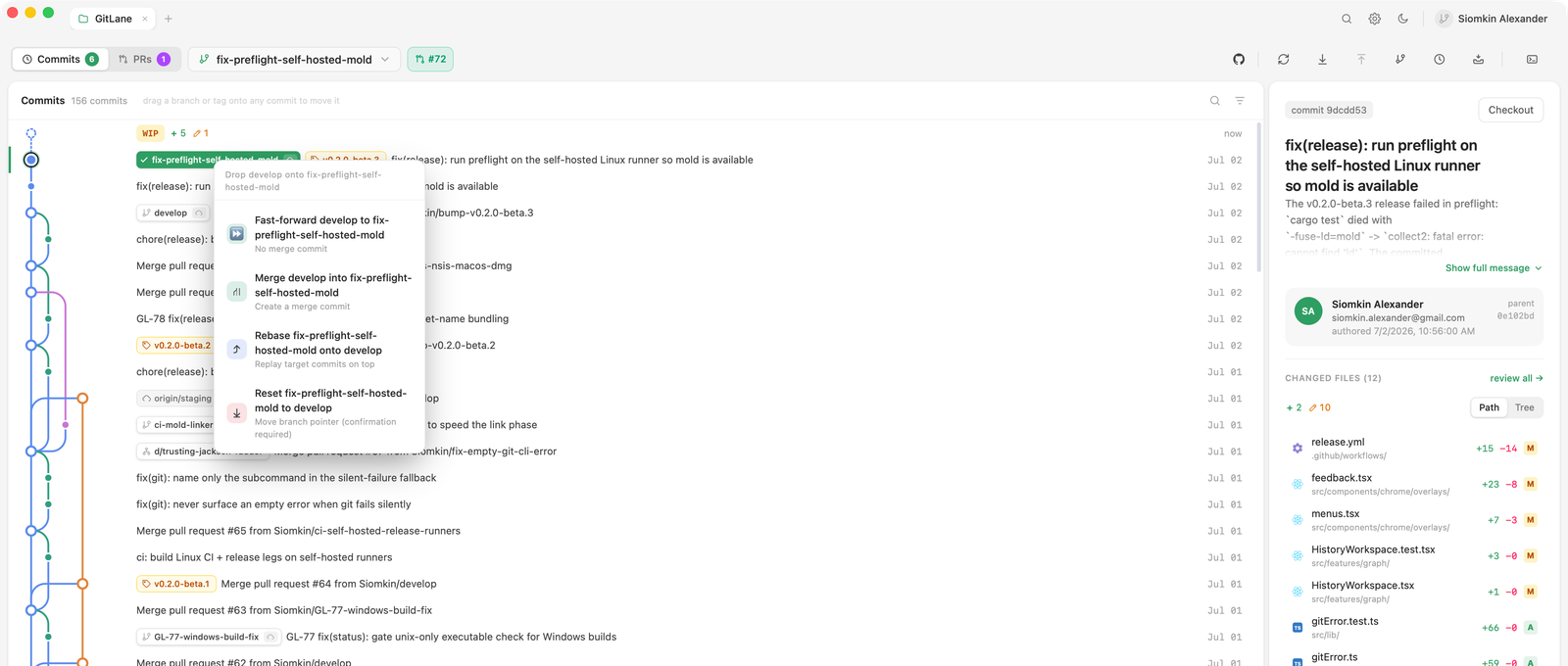
Drag and drop
Grab a branch pill — in the commit graph or in the branch navigator — and drop it onto another branch. GitLane checks how the two branches actually relate (probing fast-forward in both directions) and offers only the operations that make sense:
| Offered | When it makes sense |
|---|---|
| Fast-forward | The target can advance to the source with no new commit |
| Merge | The branches have diverged and you want a merge commit |
| Rebase | You want the source’s commits replayed onto the target |
| Reset | You want the branch pointer moved, discarding what’s ahead |
You never have to remember which flag produces which outcome — the menu is derived from the actual relationship, not from a fixed list.
The chosen operation runs through your real git binary, so hooks,
.gitconfig, signing, and the full conflict machinery all apply. If it stops
on conflicts, GitLane switches into the conflict workspace —
see Merge conflicts.
The context menu
Everything else is one right-click away in the graph:
- AI actions — describe the commit, a multi-commit selection, or the uncommitted WIP row (guide). The row shows Cmd/Ctrl + Shift + A
- Cherry-pick a commit onto the current branch
- Revert a commit
- Squash a multi-commit selection (below)
- Create a branch, tag, or worktree at any commit
- Compare any two refs
- Export a commit as a patch file
On the current branch, Pull and Push show their shortcuts (Cmd/Ctrl + Shift + L and Cmd/Ctrl + Shift + P). On the WIP row, Stash all changes shows Cmd/Ctrl + Shift + S.
Squashing commits
Select two or more commits, then Squash in the context menu. GitLane replaces them with one commit whose message you write in the prompt, seeded with the originals so nothing is lost.
The selection does not have to end at the branch tip. When there are commits above it, they are rewritten onto the replacement, keeping their message, author, and content — nothing is merged, so a squash can never stop on a conflict, and your staged and unstaged work is left exactly as it was.
The menu item only appears when the rewrite is safe, which means the selection is a contiguous run on the checked-out branch’s first-parent line, and everything from the branch tip down to the oldest selected commit is free of merge commits and not reachable from any remote-tracking branch. Squashing published commits would force everyone else to reset, so GitLane doesn’t offer it.
Reset, previewed
Reset is the one operation where “what exactly am I about to lose?” matters most, so GitLane answers it before you confirm: the dialog previews the commits that would fall away. The same applies to branch deletion, discard, and force-push.
If the repository changed underneath you between the preview and the confirm — say you committed from a terminal in between — the operation fails cleanly instead of acting on stale state.
Pulling and pushing
Pull is fast-forward only, with explicit handling when the branches have diverged — you’re told what diverged and asked what to do, rather than getting a surprise merge commit.
Force-push always uses --force-with-lease, and previews the remote commits
it would replace.
A background auto-fetch keeps remote-tracking branches current so the “behind by N” counts you’re looking at are real.