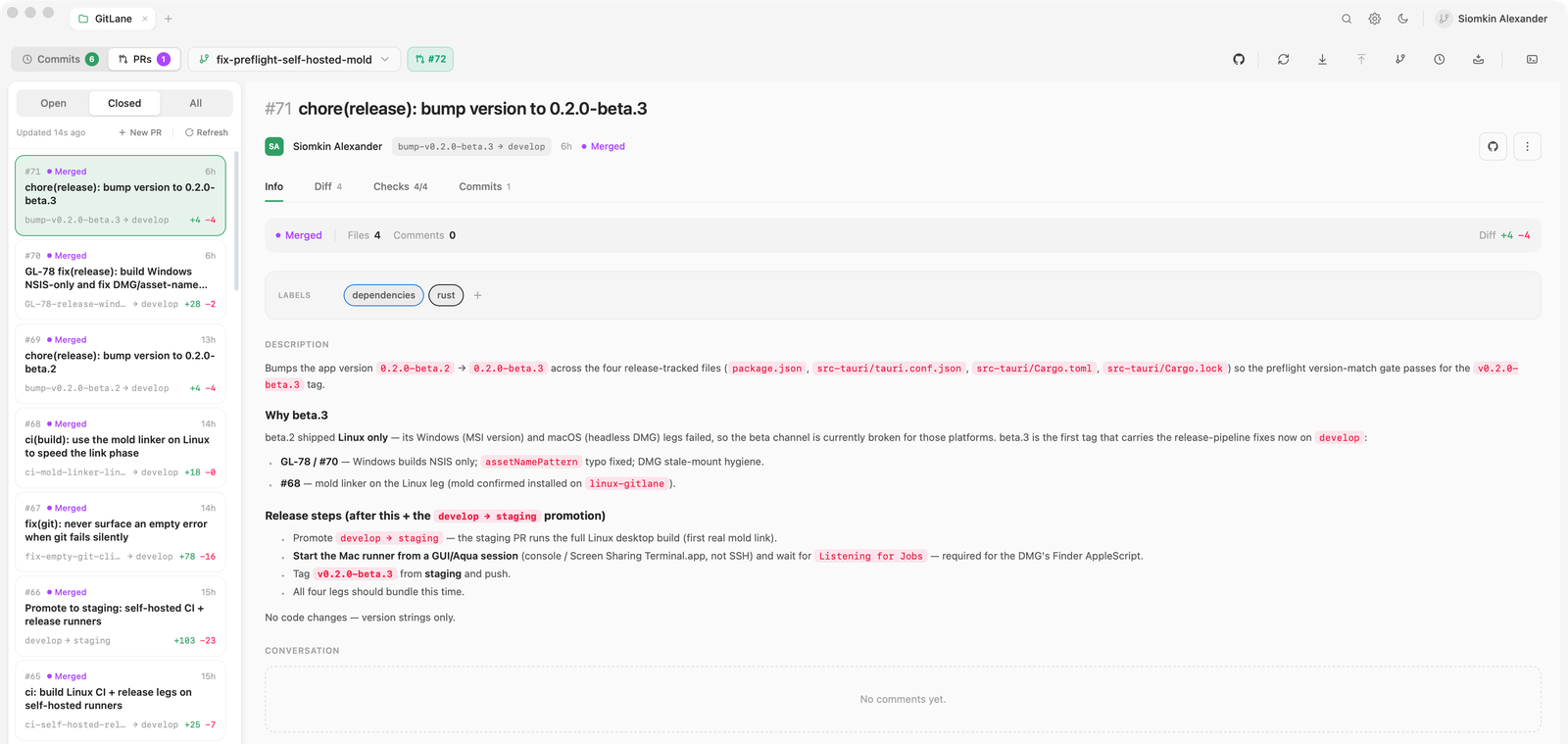
Switch to the PRs tab to browse, review, and merge pull requests for the repository you have open. GitHub gets the full experience; GitLab merge requests, Bitbucket Cloud pull requests, and Cursor Origin pull requests cover the core workflow.
What’s supported where
| Capability | GitHub | GitLab | Bitbucket | Origin |
|---|---|---|---|---|
| List, detail, full diff, commits | ✅ | ✅ | ✅ | ✅ |
| Create PR/MR (incl. drafts) | ✅ | ✅ | ✅ | not yet |
| Merge (merge commit / squash) | ✅ | ✅ | ✅ | ✅ |
| Rebase merge | ✅ | — | — | — |
| Approve | ✅ | ✅ | ✅ | not yet |
| Comments, review threads, request changes | ✅ | not yet | not yet | existing threads |
| CI checks (live polling) | ✅ | not yet | not yet | not yet |
| Close / reopen / mark ready | ✅ | not yet | not yet | not yet |
| Stacked PRs (stack card, merge stack) | ✅ | — | — | — |
Where something isn’t supported, GitLane says so explicitly rather than failing with a confusing error from the underlying CLI or API.
Connecting each forge
GitHub works through the GitHub CLI, gh
2.95+. Sign in the usual way:
gh auth loginMultiple accounts and GitHub Enterprise hosts are both supported —
gh can be logged into several at once, and GitLane binds each
repository to one of them rather than mutating your global
gh auth switch state.
Either install and sign in to the glab CLI — zero configuration, and
GitLane will use it automatically — or add a personal access token
in Settings → Accounts, which GitLane uses against the GitLab REST v4
API.
GitLab can also be connected via native OAuth (device flow), which stores the resulting token in your OS keychain.
Bitbucket Cloud has no first-party CLI, so GitLane talks to the REST 2.0 API. Add an Atlassian API token in Settings → Accounts — legacy app passwords also work.
Bitbucket can also be connected via native OAuth (PKCE loopback), which stores the resulting token in your OS keychain.
Cursor Origin works through the Origin CLI. Sign in the usual way:
origin auth loginGitLane uses that CLI session and never stores an Origin token. Native
Windows is not supported — use macOS, Linux, or WSL. Fetch and push stay
on your git credential helper or SSH; GitLane never injects gh
credentials for origin.cursor.com.
Reviewing
Open a pull request to get its body, its file list, its commits, and — on GitHub — CI checks that poll live while you look at them. Diffs use the same renderer as the rest of the app: unified or split, syntax-highlighted, with a minimap.
On GitHub you can also work with comments and review threads, and request changes, without leaving the app. On Cursor Origin you can reply to, resolve, and reopen existing review threads; starting a new inline thread is not available yet. AI actions can Post to PR — adding the generated text as a comment on the open pull request for the current branch.
Stacked pull requests
When a GitHub pull request is part of a stack, its Info tab shows a stack card: every layer from the base branch up, drawn top-first, with the one you’re viewing highlighted and the trunk pinned at the bottom. Each layer carries its own state — Merged, Closed, Draft, Conflicts, Not ready, or Ready.
One state is GitLane’s own reading rather than a value GitHub hands over per pull request:
The header states what merging from here would do — Able to merge as a stack with the count of layers below, or Bottom of a stack when yours is the lowest unmerged one — and Merge stack in the footer performs it: your pull request plus every unmerged layer below it, in one atomic operation, with a merge method you pick. If any layer can’t merge, none of them do; the confirmation spells that out, and the button’s badge shows how many pull requests will land.
Merge stack is shown but disabled, with the reason above it, in two cases:
- A layer in the merge set can’t merge — it’s a draft, has conflicts, or isn’t passing its required checks.
- The stack is larger than the layers GitLane could load — the card says Showing N of M layers. An unseen layer could be blocked, and an all-or-nothing merge would sink on it, so GitLane won’t promise the merge it can’t verify.
Base-branch rules — a required approval, say — are deliberately not treated as a blocker here: GitHub’s own stack UI offers the merge and lets the server refuse, and GitLane surfaces that refusal verbatim.
Creating a stack and restacking it after a rebase are not available in GitLane
yet — use gh or the GitHub web UI for those, then GitLane will show and merge
the stack.
Other forges
Repositories on Azure DevOps, Gitea, or Forgejo/Codeberg work fine for everything else — commit, branch, push, pull. Only the pull-request view is unavailable there, and GitLane tells you so.