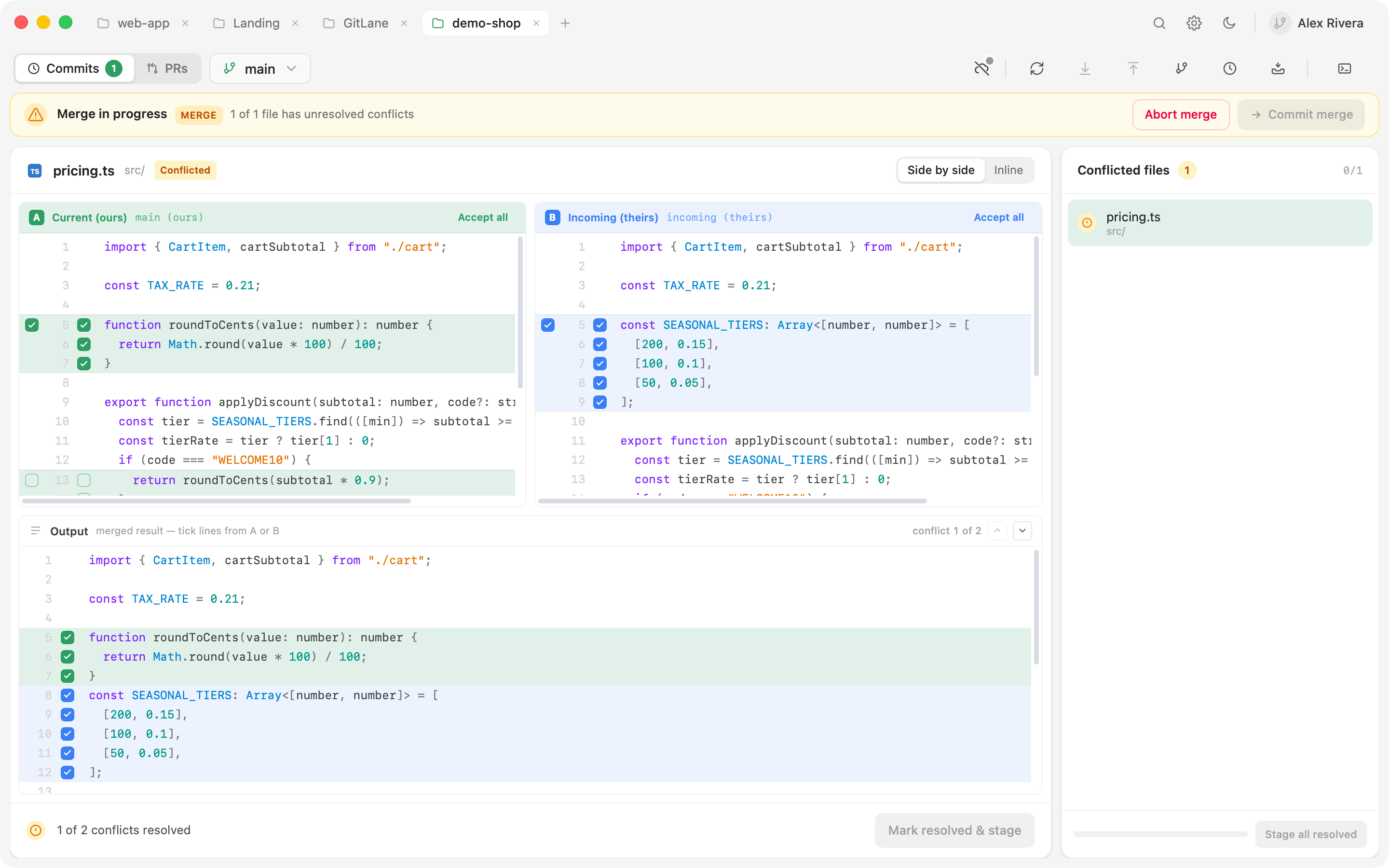
When a merge, rebase, cherry-pick, or revert stops on conflicts, GitLane switches into a conflict workspace. You don’t have to go find a terminal to finish the operation.
Resolving
Pick a file
Conflicted files are listed with what kind of conflict each one is.
Resolve
Work hunk-by-hunk in an inline or side-by-side editor, picking per line where you need to. For a file you don’t need to be surgical about, take ours or theirs wholesale.
Continue, skip, or abort
Once the conflicts are resolved, continue the operation — or skip this commit, or abort the whole thing and return to where you started.
Resolve with AI
When an in-app agent is configured, the conflict workspace offers Resolve
with AI for a text conflict — optionally with a note for the agent — and
Resolve all to queue several files (up to three at a time). The proposal
lands in Output so you can review it, then Apply & stage or discard it.
The same agent rules as Draft apply: no auto-approved
writes, read-only git only.
The awkward cases
Binary conflicts and modify/delete conflicts are handled explicitly rather than dumped on you as raw markers.
Resolved outside GitLane? If you fixed a file in your own editor, stage it as-is — GitLane accepts the file as the resolution.
Changed your mind? A staged resolution can be un-staged so you can redo it.